
To view/edit your Tax Elections (W-4):
-
Log into Ozone.
-
Click Workday.
-
Select Submit or Skip to have the Workday remember your device.
-
Once in Workday, click the Menu icon in the upper left corner of the Workday page.
-
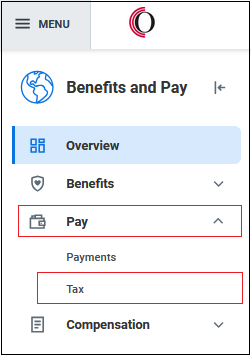
Select Benefits and Pay under the Personal section.
-
Click Pay.
-
Click Tax on the dropdown menu.
-
You are now at the Payroll Hub - Worker Tax Information page. From here, you update your Tax Elections (W4), tax withholdings. You can also view and print your Tax Documents.
Note: If you need a copy of a W2 dated before 2023, please contact Payroll at payroll@owens.edu or the Payroll Manager at (567) 661-7269.